
Create the invitation
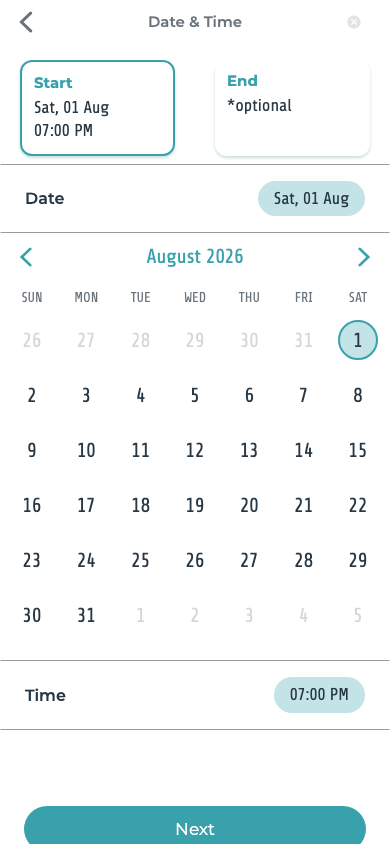
Add the time and, if useful, a location, plus the details guests need.
One place for the plan
Create an invitation, settle the time and place, see who’s coming, and keep every update with the event—not buried in a group chat.
Available for iPhone and Android. Guests can respond from their invitation link.



From idea to confirmed
Add the time and, if useful, a location, plus the details guests need.
Send the invitation link through the channel your group already uses.
See who is coming and use voting when the group still needs to decide.
Questions, media, and changes remain connected to the event.
Less back-and-forth
Time, place, and useful details are easy to find.
See attending, declined, and undecided replies.
Offer a few choices and let the group weigh in.
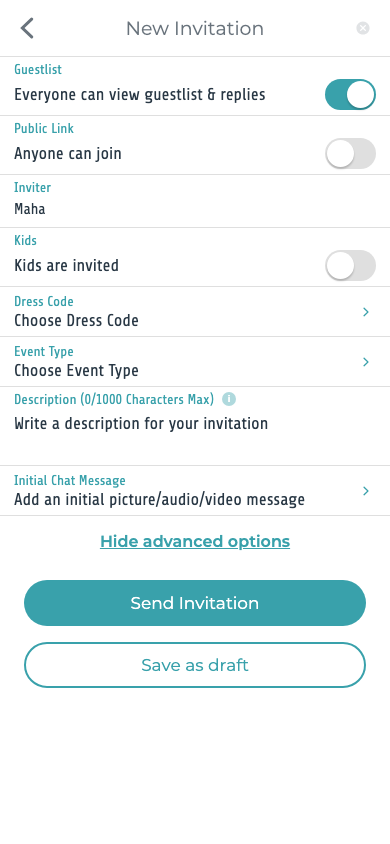
Choose whether invitees can see the guest list.
Keep questions, photos, and files attached to the plan.
Invite recurring groups without rebuilding the list every time.
Easy for guests
An invited guest can review the invitation in a supported browser. Responding in the browser requires phone verification.
Made for real life
Give guests the time, place, expectations, and a clear way to respond.
Plan a birthdayTurn a dinner, coffee, game night, or day trip into a plan the group can settle.
Plan a hangoutCoordinate different schedules, cities, ages, and practical needs in one place.
Plan a family gatheringShare the celebration details and get a useful headcount before the big day.
Plan a graduationIdeas & guides
Use a short list of realistic choices, a clear voting window, and one final decision.
Read the guideWrite a useful follow-up that is clear, timely, and easy to answer.
Read the guideWork backwards from arrival time so invitations, food, and final details stay manageable.
Read the guideInside Hub App
Clear screens help hosts and guests stay on the same plan without the message chase.

Hub App helps you create invitations, collect RSVPs, vote on a time or place, and keep event details and conversation together.
It is for friends, families, and groups arranging anything from a casual hangout to a birthday, family gathering, or graduation celebration.
Yes. Hosts register so they can create invitations, manage details, and follow guest responses.
Not always. An invited guest can review an invitation in a supported browser. Responding in the browser requires phone verification.
You can add the event name, date, time, location, description, guests, and the options available for that invitation in the app.
Start here
Put the invitation, replies, and updates in one place.